
Plugins
A plugin is the smallest thing the runtime cares about as a unit. It has an identity, a lifecycle, and a bit of code that wires behavior into a service registry and an event bus. Everything else in Plugin Kit (services, events, sessions, settings) exists to move plugins around: enable them, disable them, compose them, isolate them, replace them.
Plugins are wiring; services are the meat. The plugin class declares an id, registers services, and stays small. State, configurable behavior, and event subscriptions belong in services. See Plugin Services for picking the right service base class.
Pick a scope first
Section titled “Pick a scope first”Every plugin extends one of these two base classes.
| Scope | Base class | Lives for | Typical use |
|---|---|---|---|
| Global | GlobalPlugin<G> | the runtime’s lifetime | app-wide observers, shared services, cross-session orchestration |
| Session | SessionPlugin<S> | one session | documents, tabs, chats, workspaces, sandboxes |
The choice is architectural, not cosmetic. A global plugin is instantiated once per runtime and outlives every session.
A session plugin instance is shared across sessions; its register and attach lifecycle runs per session, and detach runs when that session ends.
Rule of thumb: if there should be exactly one of this thing for the whole process, make it global. If there should be one per document, chat, tab, tenant, or sandbox, make it a session plugin. Session plugins are generally preferred when in doubt. Treating your entire app lifecycle as a single “Session” is a common and valid choice, and it leaves the door open to adding more sessions later if you need them.
Why it helps to default to sessions
Section titled “Why it helps to default to sessions”- Your app becomes portable/modular. A “preview” screen inside your app can be its own session.
- You get a clean slate for testing. Each test can open a new session with just the plugins it needs in parallel under the same Plugin runtime. Several runtimes can be created in parallel of course, but that is more expensive.
- If you ever need to benchmark your app, you can create many sessions under one runtime while each session still gets a fresh registry.
- The mental model is simpler. Every plugin has the same lifecycle and the same relationship to the runtime and to each other. You do not have to reason about global vs session interactions, just plugin vs plugin interactions.
Go for sessions unless you really know you need globals. The library does not force you to choose, you can have both. Session plugins can depend on enabled global plugins, but global plugins cannot depend on session plugins. The runtime handles the lifecycle and the dependency graph either way.
What a plugin looks like
Section titled “What a plugin looks like”Here is a typical session plugin in full.
class GreeterPlugin extends SessionPlugin {  @override  PluginId get pluginId => const PluginId('greeter');
  @override  void register(ScopedServiceRegistry registry) {    registry.registerLazySingleton<GreeterService>(      const ServiceId('greeter_service'),      () => GreeterService(),    );  }
  @override  void attach(SessionPluginContext context) {    on<UserJoinedEvent>(context, (event) {      final greeter = context.resolve<GreeterService>(        const ServiceId('greeter_service'),      );      greeter.sayHello(event.event.userId);    });  }}
The example above shows the two hooks every plugin will write: register puts services in the registry,
attach subscribes to events. Two more come up when you handle teardown or live config: detach cleans up,
and onPluginSettingsChanged reacts to settings updates without a full reattach.
pluginId, dependencies, and featureFlags are declarative metadata the runtime reads during lifecycle.
The ScopedServiceRegistry passed to register already knows your plugin id, so you never have to repeat the plugin id in your plugin class.
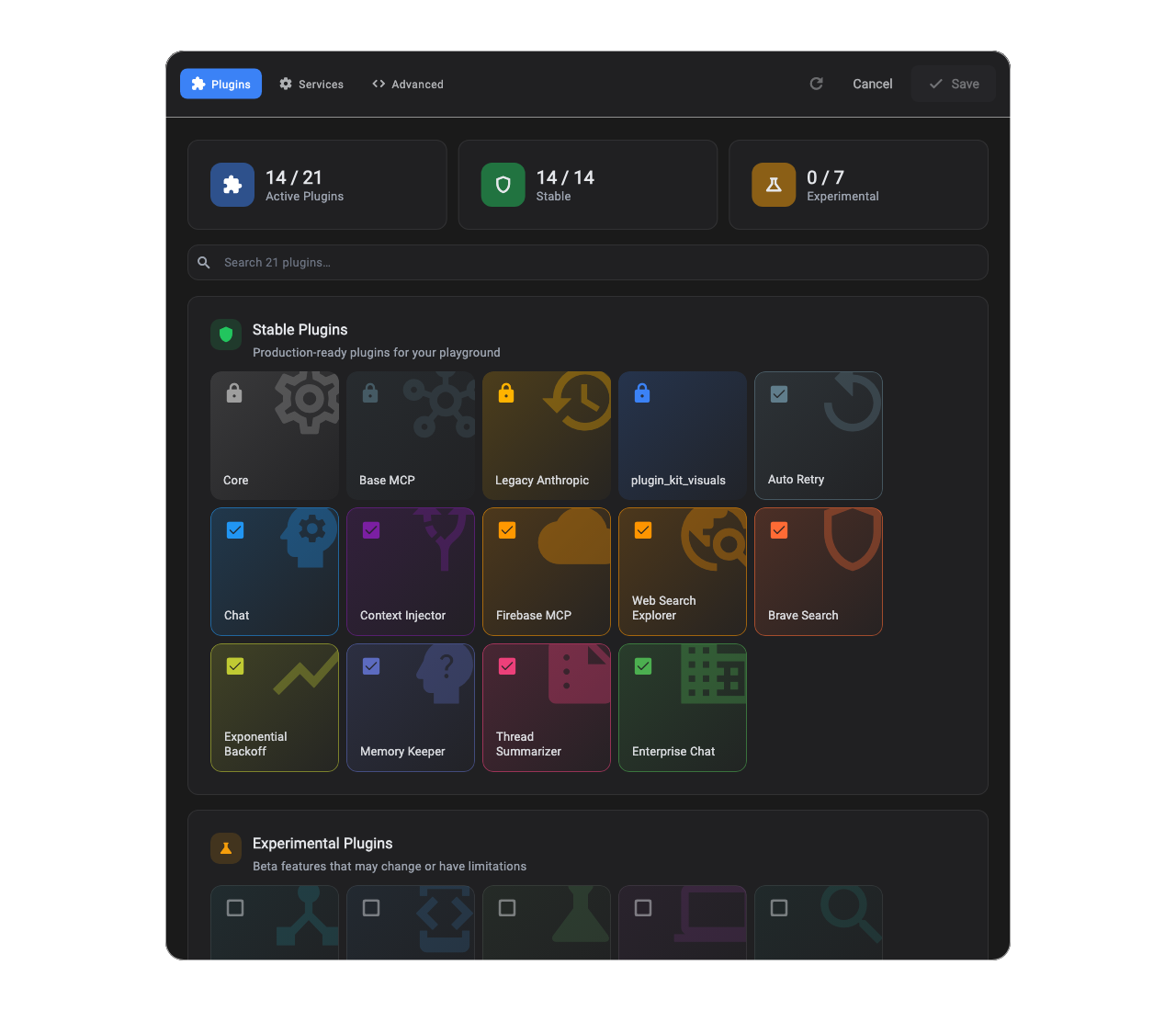
The Plugins tab is what your pluginId declarations look like once the runtime has them. Each tile is one plugin, and each toggle updates the dialog draft.
The visuals are from the Plugin Kit Dialog, a built-in customization surface that ships with the library. It reflects runtime state and staged draft changes, and
lifecycle updates run when you save. The dialog is optional, but it is a useful reference for what your plugin
metadata looks like in practice. The color, icon, title, and description of your plugin can be registered via the plugin_kit_dialog package.
How the lifecycle shapes plugin code
Section titled “How the lifecycle shapes plugin code”Every plugin runs through three phases (register → attach → detach) inside its scope. register populates the registry. attach is where the plugin subscribes to events. detach tears down. A fourth hook, onPluginSettingsChanged, fires for plugins that stay enabled across a settings update so they can react without a full reattach. See Plugins & Lifecycle for the full reference.
The shape of those phases is load-bearing for how Plugin Kit code is written.
- No order guarantees within a phase. Other plugins may not be registered yet during your
register, and the order plugins attach in is also not guaranteed. A direct reference cached duringattachcan go stale when a higher-priority plugin is enabled later. Resolve services at point of use, not at attach time. - Be reactive, not eager. Plugin Kit pushes work toward “react when called or when an event fires.” A service that does work in its constructor or during
registerruns that work even when nothing is asking for it, which breaks hot-swap, dependency cascade, and lazy initialization.
That stricture pays off in three ways.
- Hot-swappable features. A higher-priority plugin can take over a slot live; if your service does nothing until called, the swap is invisible to callers.
- Safe dependency declarations. A plugin auto-disables when its dependency is missing. As long as your plugin does no work until called, it can be disabled without leaving zombies.
- Lazy initialization. Work runs only when something asks for it. Toggling a plugin off and on re-runs
registerandattach, so startup work in those hooks runs again.
Plugin.attach, Plugin.detach, and PluginService.onSettingsInjected are pure user hooks with no-op default implementations. The framework orchestrates around them. See Plugin Services.
Declaring dependencies
Section titled “Declaring dependencies”A plugin can name other plugins it depends on.
class FormatterPlugin extends SessionPlugin {  @override  PluginId get pluginId => const PluginId('formatter');
  @override  Set<PluginId> get dependencies => const {PluginId('formatter_pipeline')};
  @override  void register(ScopedServiceRegistry registry) {}}
The runtime validates dependencies transitively. If A depends on B and B depends on C, disabling C cascades: B gets disabled, then A, in order.
Session plugins can depend on enabled global plugins, not just other session plugins.
Locked plugins are the exception. A plugin that declares FeatureFlag.locked stays enabled even when a dependency is missing, and the runtime logs that
situation as a configuration error instead of silently disabling the plugin. Use this sparingly: locking around a missing dependency hides config
errors instead of surfacing them.
Feature flags
Section titled “Feature flags”Two flags ship with the library: FeatureFlag.experimental (off by default; settings must explicitly enable it) and FeatureFlag.locked (always on; settings cannot disable it). Both let plugin authors carry behavioral intent without the host app inventing a separate flagging system.
The interesting consequence is that experimental is a default, not a block. The precedence the runtime applies, highest to lowest, is locked, then explicit RuntimeSettings.plugins entries, then the experimental heuristic. Settings can still enable an experimental plugin; it just will not be on unless someone opts in. See Plugins & Lifecycle for the full mechanics and signature.
Identity and uniqueness
Section titled “Identity and uniqueness”Two plugin instances are considered equal only if both runtimeType and pluginId match.
Runtime registration’s PluginRuntime.addPlugin(...) rejects any duplicate pluginId, regardless of scope. In practice,
treat pluginId as unique across the whole runtime, not just within its scope.
Thin plugin, fat service
Section titled “Thin plugin, fat service”A useful default when a plugin class starts to grow:
- Keep the plugin class focused on wiring.
pluginId,register,attach,detach. Not much else. - Put reusable logic in ordinary services (subclasses of
PluginServiceif you want typed settings, or any plain Dart class if you do not). - Put session-bound subscriptions and mutable state in
StatefulPluginServices, so the runtime can attach and detach them for you.
When a plugin class is holding runtime state itself, that is usually a hint that the state wants to move into a service. Plugin Services covers that move in detail.