
Plugin Kit Dialog
Plugin Kit Dialog is a Flutter dialog that inspects and edits any PluginRuntime at runtime. Drop it in once and your users get a three-tab UI for toggling plugins, editing service config, and inspecting the registry. You write zero settings-screens-per-plugin code.
The dialog is built from internal plugin_kit plugins. Tabs and field renderers come from the dialog’s internal runtime, so host app plugins cannot shadow or replace them. Header actions (Reset all, Cancel, Save) are built-in widgets.
Install
Section titled “Install”dependencies: plugin_kit: ^PUBVER_plugin_kit plugin_kit_dialog: ^PUBVER_plugin_kit_dialogplugin_kit carries the dart-only declaration types (UiConfigurableCapability, ConfigField, etc.). plugin_kit_dialog adds the Flutter UI on top.
Quick start
Section titled “Quick start”Future<void> openConfigDialog( BuildContext context, PluginRuntime myRuntime, RuntimeSettings currentSettings,) async { final next = await showPluginKitDialog( context: context, runtime: myRuntime, initialSettings: currentSettings, onSave: (settings) async { await persistSettings(settings); // write to disk, push to runtime, etc. }, ); if (next != null) { // User saved. `next` is the merged RuntimeSettings. }}That is it. If your plugins already attach UiConfigurableCapability, the Services tab populates itself.
onSave is awaited before the dialog closes, so you can persist (write to disk, push to a server, call runtime.updateSettings(...)) without racing the dismissal.
What the three tabs do
Section titled “What the three tabs do”Plugins tab
Section titled “Plugins tab”Enable and disable plugins live. Stable plugins toggle freely; experimental plugins are flagged; plugins declaring FeatureFlag.locked cannot be turned off and the runtime logs a configuration error if their dependencies disappear.
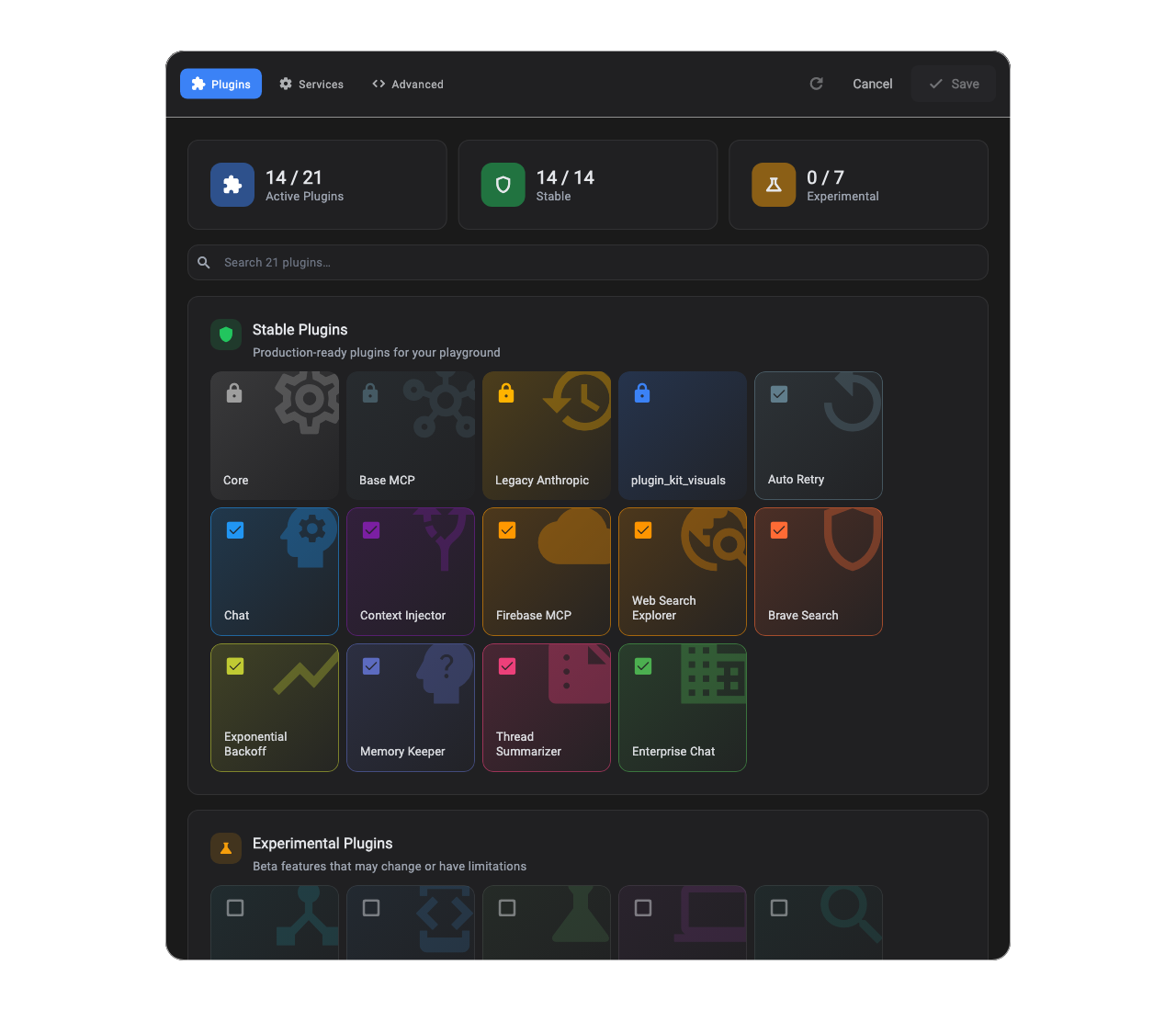
Each tile is one plugin. Decorated tiles get their icons, labels, and accent colors from PluginKitVisualsPlugin, a single host-app plugin that maps visuals across the plugin, namespace, and service axes.
Services tab
Section titled “Services tab”Each resolved winner in runtime.sessions.lastOrNull?.registry ?? runtime.globalRegistry that ships a UiConfigurableCapability becomes an editable card. Text, numbers, dropdowns, switches, multiline, password, and grouped fields are supported.
Advanced tab
Section titled “Advanced tab”A registry inspector with priority chains, winners, shadowed contenders, and a JSON view of the working draft. It inspects runtime.globalRegistry, even when sessions are active.
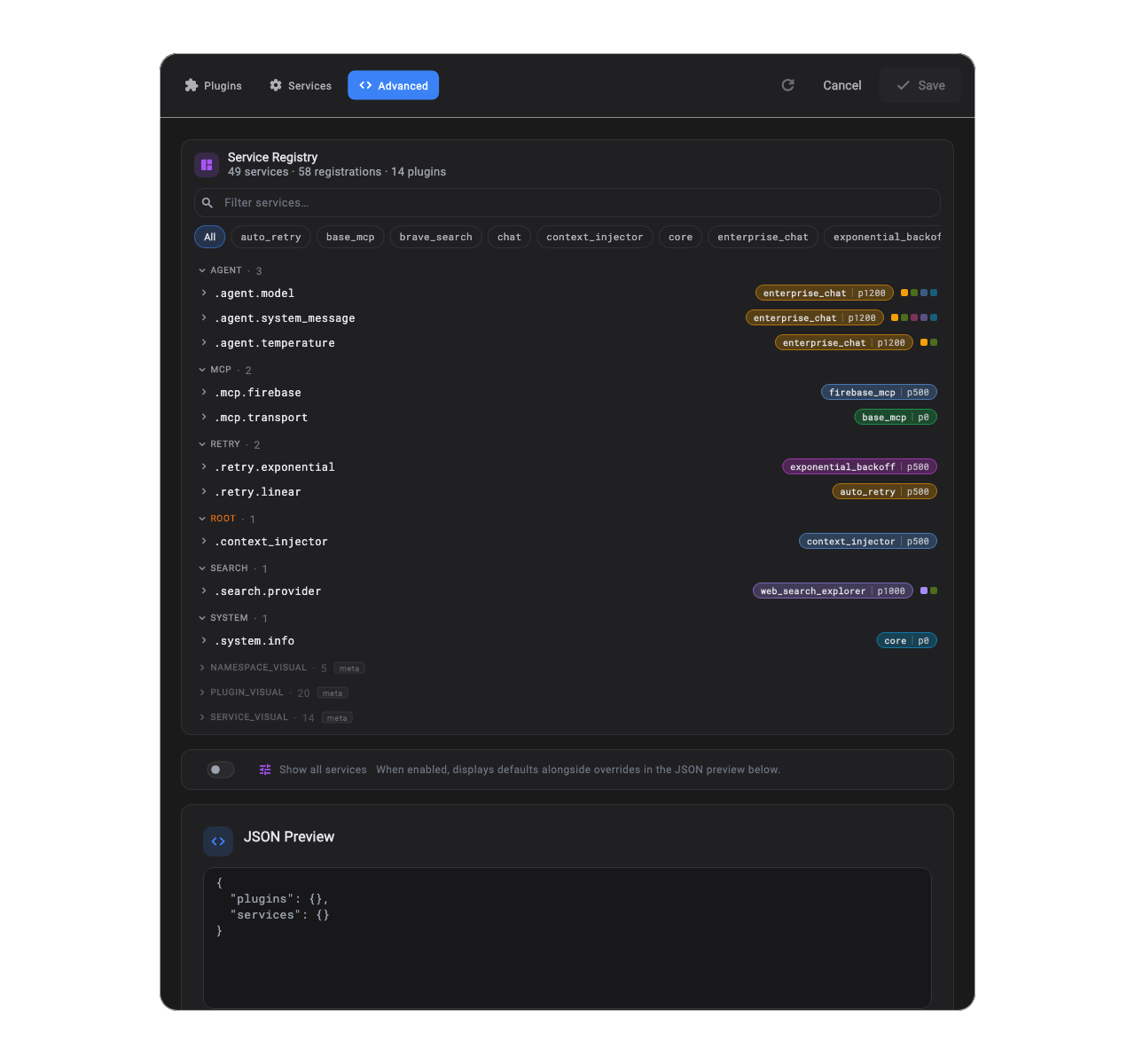
Each row is a slot. Chips on the right show registrations in priority order, with the current winner picked out and any meta entries (visuals contributions, wildcard fallbacks) marked. The JSON preview shows the current working RuntimeSettings snapshot, not a baseline diff.
Declaring configurable services
Section titled “Declaring configurable services”Configurability is opt-in per registration. Attach a UiConfigurableCapability next to any service:
void registerConfigurableService(ScopedServiceRegistry registry) {  const agent = Namespace('agent');
  registry.registerSingleton<MyService>(    agent('temperature'),    () => const MyService(),    capabilities: const {      UiConfigurableCapability(        label: 'Temperature',        description: 'Controls randomness in responses.',        fields: [          NumberConfigField(            key: 'temperature',            label: 'Temperature',            min: 0,            max: 2,            step: 0.1,            defaultValue: 1.0,          ),        ],      ),    },  );}
Saved values flow through RuntimeSettings.services[Pin('main_agent', ['agent', 'temperature'])].config (or, if you prefer the dotted shorthand, pluginId.namespace('agent').service('temperature')). From there, Configuration covers how the service reads them via config.getDouble('temperature') and similar typed accessors.
Built-in field types
Section titled “Built-in field types”All field types live in plugin_kit (Dart-only):
| Field | Renders as |
|---|---|
TextConfigField | Single-line TextField. |
MultilineConfigField | Multiline editor with optional moustache-tag chips. |
PasswordConfigField | Obscured input with show/hide toggle. |
NumberConfigField | Slider when both min and max are set; numeric TextField otherwise. style: NumberFieldStyle.textInput forces text mode. isInteger: true stores int and snaps to whole numbers. |
DropdownConfigField<T> | Typed dropdown over List<DropdownOption<T>>. |
BoolConfigField | Switch with label and helper text. |
GroupConfigField | Indented sub-section grouping nested fields under a heading. |
ExtensionConfigField | Escape hatch for custom Flutter renderers. See Custom field renderers below. |
Each field carries key, label, helperText, and defaultValue. Dotted keys (provider.api_key) write to nested maps automatically.
Visuals: icons, colors, labels
Section titled “Visuals: icons, colors, labels”Visuals are a Flutter-only concern, so the canonical attachment path is a single locked GlobalPlugin that carries host-app overrides. Three independent maps cover the three things the dialog renders: plugin tiles, namespace section headers, and individual service cards.
void addVisualsPlugin(PluginRuntime runtime, List<Plugin> myPlugins) { runtime ..addPlugins(myPlugins) ..addPlugin( PluginKitVisualsPlugin( pluginVisuals: { const PluginId('main_agent'): const PluginKitVisual( label: 'Main Agent', description: 'The brain. Drives chat, tools, and routing.', icon: Icon(Icons.psychology), color: Color(0xFF7C5CFF), ), }, namespaceVisuals: { const Namespace('agent'): const PluginKitVisual( label: 'Agent', icon: Icon(Icons.smart_toy), color: Color(0xFF7C5CFF), ), }, serviceVisuals: { const Namespace('agent')('temperature'): const PluginKitVisual( label: 'Temperature', icon: Icon(Icons.thermostat), color: Color(0xFFFF9500), ), }, ), );}Because the visuals plugin lives in your host app (which has Flutter), Dart-only plugins still get icons, labels, and colors without importing Flutter. The decoration is keyed by PluginId, Namespace, or ServiceId, so the host owns the map and the plugin source code stays portable.
The plugin registers at priority 1000, above the default registry priority of 500, so host overrides beat visuals a Flutter plugin self-attaches at default priority from its own register(). Registrations above 1000 still win. Unknown keys (a plugin or service that does not currently exist) are accepted silently; this lets you keep visuals for plugins that may be enabled later. When no visual is found, cards fall back to a generic gear icon and the theme’s primary color.
Custom field renderers
Section titled “Custom field renderers”Need a color picker, file selector, or any other widget? Declare an ExtensionConfigField from anywhere (no Flutter dependency at the field site):
const extensionField = ExtensionConfigField( key: 'theme.accent', label: 'Accent color', rendererKey: 'color_picker', args: {'allow_alpha': false},);The default showPluginKitDialog and PluginKitDialogBody entry points use a private dialog runtime with fixed built-in plugins, so host-runtime renderer registrations are not used.
/// A custom field renderer for color values (Flutter-side).class ColorPickerRenderer implements ConfigFieldRenderer<ExtensionConfigField> {  /// Creates a [ColorPickerRenderer].  const ColorPickerRenderer();
  @override  Widget build(    BuildContext context,    ExtensionConfigField field,    ConfigFieldHandle handle,    FieldRenderResolver resolveRenderer,  ) {    final allowAlpha = field.args['allow_alpha'] as bool? ?? false;    return Slider(      value: ((handle.value as int?) ?? 0xFF000000).toDouble(),      min: 0,      max: 0xFFFFFFFF.toDouble(),      onChanged: (next) => handle.value = next.toInt(),      label: allowAlpha ? 'ARGB' : 'RGB',    );  }}
class ColorPickerRendererPlugin extends GlobalPlugin {  @override  PluginId get pluginId => const PluginId('color_picker_renderer');
  @override  void register(ScopedServiceRegistry registry) {    registry.registerFactory<ConfigFieldRenderer>(      FieldRenderersPlugin.namespace('color_picker'),      ColorPickerRenderer.new,    );  }}
If a renderer key is unknown when the dialog tries to resolve it, an inline placeholder card surfaces the missing key. The dialog never throws at paint time.
Theming
Section titled “Theming”Pass a PluginKitDialogTheme to override accents, surfaces, and badges:
/// Demonstrates showPluginKitDialog with a custom [PluginKitDialogTheme].Future<void> openConfigDialogThemed( BuildContext context, PluginRuntime myRuntime, RuntimeSettings settings, Future<void> Function(RuntimeSettings) persist,) async { await showPluginKitDialog( context: context, runtime: myRuntime, initialSettings: settings, onSave: persist, theme: PluginKitDialogTheme.dark().copyWith( stableAccent: Colors.greenAccent, experimentalAccent: Colors.deepOrange, ), );}Or wrap your app with buildPluginKitDialogDarkTheme() / buildPluginKitDialogLightTheme() to adopt the full Material 3 ThemeData.
Why dart-only declarations matter
Section titled “Why dart-only declarations matter”The capability and field types live in plugin_kit, not in this package. That means a non-Flutter package (server-side service, CLI, shared common/ library) can declare configurable services without taking a Flutter dependency. The Flutter UI layers on top through:
PluginKitVisualsPlugin(Flutter, host-app side) for icons, labels, and colors across the plugin, namespace, and service axesExtensionConfigFieldplus a registered Flutter renderer for custom widgets
That keeps your shared plugin packages portable. The host app owns the Flutter-only glue.
Saving and dirty state
Section titled “Saving and dirty state”The dialog is non-destructive. Edits accumulate in a working draft; nothing reaches the runtime until the user hits Save. onSave receives the merged RuntimeSettings; persist it however you like. Cancel discards the draft, with a confirm prompt if it is dirty.
Overrides matching the active baseline are pruned automatically, so the resulting RuntimeSettings stays minimal. Two users with different starting points can save the same diff.
Example app
Section titled “Example app”A runnable demo with 20 competing plugins (priority towers on agent.model, agent.system_message, retry.policy, search.provider, plus locked and experimental tiers) plus one PluginKitVisualsPlugin decorating every plugin, namespace, and service (21 total runtime plugins) lives at example/plugin_kit_dialog_demo. Open the live web build, or run it locally with flutter run from that directory.
The screenshots above are golden-tested against that demo, so what you see here is exactly what the demo renders.
Public API
Section titled “Public API”Future<void> openConfigDialog( BuildContext context, PluginRuntime myRuntime, RuntimeSettings currentSettings,) async { final next = await showPluginKitDialog( context: context, runtime: myRuntime, initialSettings: currentSettings, onSave: (settings) async { await persistSettings(settings); // write to disk, push to runtime, etc. }, ); if (next != null) { // User saved. `next` is the merged RuntimeSettings. }}Declarative types come from plugin_kit:
import 'package:plugin_kit/plugin_kit.dart';
UiConfigurableCapability({label, fields, description});TextConfigField, MultilineConfigField, PasswordConfigField,NumberConfigField (NumberFieldStyle, isInteger),DropdownConfigField<T>, DropdownOption<T>,BoolConfigField, GroupConfigField,ExtensionConfigField (rendererKey, args),ConfigField                          // sealed baseConfigFieldHandle                    // value/reset handle for renderers