
Settings & Overrides
RuntimeSettings is how the outside world tells the runtime what to do.
It controls two different things:
- which plugins are enabled
- how specific service slots are configured or reprioritized
Both are live-reconcilable. You can hand the runtime a new RuntimeSettings at any time and it will converge, attaching and detaching as needed.
Read Configuration first if your question is “how does a service read its config?” Stay here if your question is “how does the host change what the runtime is doing?”
This is the piece that makes a real customization surface believable.
When a user opens a settings dialog, disables one feature, changes which implementation should win a slot, and saves, you do not want a scavenger hunt of manual teardown, rebuild, and stale singleton cleanup. You want one update call and a runtime that converges.
The shape
Section titled “The shape”final settings = RuntimeSettings( plugins: { const PluginId('sql_language'): const PluginConfig(enabled: true), const PluginId('experimental_router'): const PluginConfig(enabled: false), }, services: { const PluginId('linter_suite').service('line_length_linter'): const ServiceSettings(config: {'max_line_length': 120}), PluginId.wildcard.service('agent_service'): const ServiceSettings( priority: 200, config: {'provider': 'openai'}, ), },);Two maps do the work.
| Field | Key format | Purpose |
|---|---|---|
plugins | pluginId | enable or disable whole plugins |
services | pluginId:serviceId or *:serviceId | override a specific service slot |
Plugin-level enablement
Section titled “Plugin-level enablement”Plugin enablement follows a fixed precedence.
FeatureFlag.lockedwins immediately.- Explicit
PluginConfig.enabledis respected next. - Otherwise the experimental heuristic kicks in: stable plugins on by default, experimental plugins off by default.
So:
- Stable plugins are enabled by default.
- Experimental plugins are disabled by default.
- Explicit settings beat both defaults.
- Locked plugins stay enabled regardless.
Dependency validation runs after that base decision, and it is transitive.
PluginConfig has two fields, but mostly one matters today
Section titled “PluginConfig has two fields, but mostly one matters today”PluginConfig contains enabled and config. In the current runtime, enabled drives lifecycle. The arbitrary config map is preserved by the settings model but is not automatically injected into plugins.
If you need plugin-wide configuration, read PluginConfig.config explicitly from your application layer, or (better) move the config onto a service that the plugin registers and let the registry do the injection.
Service keys
Section titled “Service keys”Service override keys come in two forms.
| Key | Meaning |
|---|---|
pluginId:serviceId | target one plugin’s registration for that slot |
*:serviceId | target the current winning registration for that slot |
'linter_suite:line_length_linter' // specific plugin'*:agent_service' // whoever currently winsThe *: form is the wildcard, or “winner-scoped,” override.
What ServiceSettings can change
Section titled “What ServiceSettings can change”ServiceSettings has three knobs.
| Field | Meaning |
|---|---|
config | settings injected into PluginServices |
priority | effective priority override for the targeted registration |
enabled | on/off value carried in the settings model |
The common runtime uses are:
- plugin-level enablement through
PluginConfig - service-level enablement through
ServiceSettings.enabled(disabled registrations are skipped, and resolution falls through to the next-highest-priority enabled one) - service-level config injection through
ServiceSettings.config - service-level competition changes through
ServiceSettings.priority
Wildcard overrides
Section titled “Wildcard overrides”Wildcard overrides are one of the more useful pieces of the system.
If multiple plugins register the same slot, *:serviceId applies to whichever registration currently wins that slot.
/// settings via `PluginService.config`. Three scenarios:////// 1. Default (max 80). An 85-char line is flagged./// 2. Service override (max 120). The same line passes./// 3. Wildcard override (`*:line_length_linter`). Same effect as scenario 2,/// via the winner-scoped override syntax.////// `DiagnosticCollectorPlugin` exposes a session-scoped collector so each/// scenario can read the diagnostics published by [LinterSuitePlugin] in/// response to [DocumentSavedEvent].library;You can target a slot by role instead of by plugin id. That matters when:
- the winning plugin may change at runtime
- the host UI configures a slot generically
- you want one setting to follow the winner
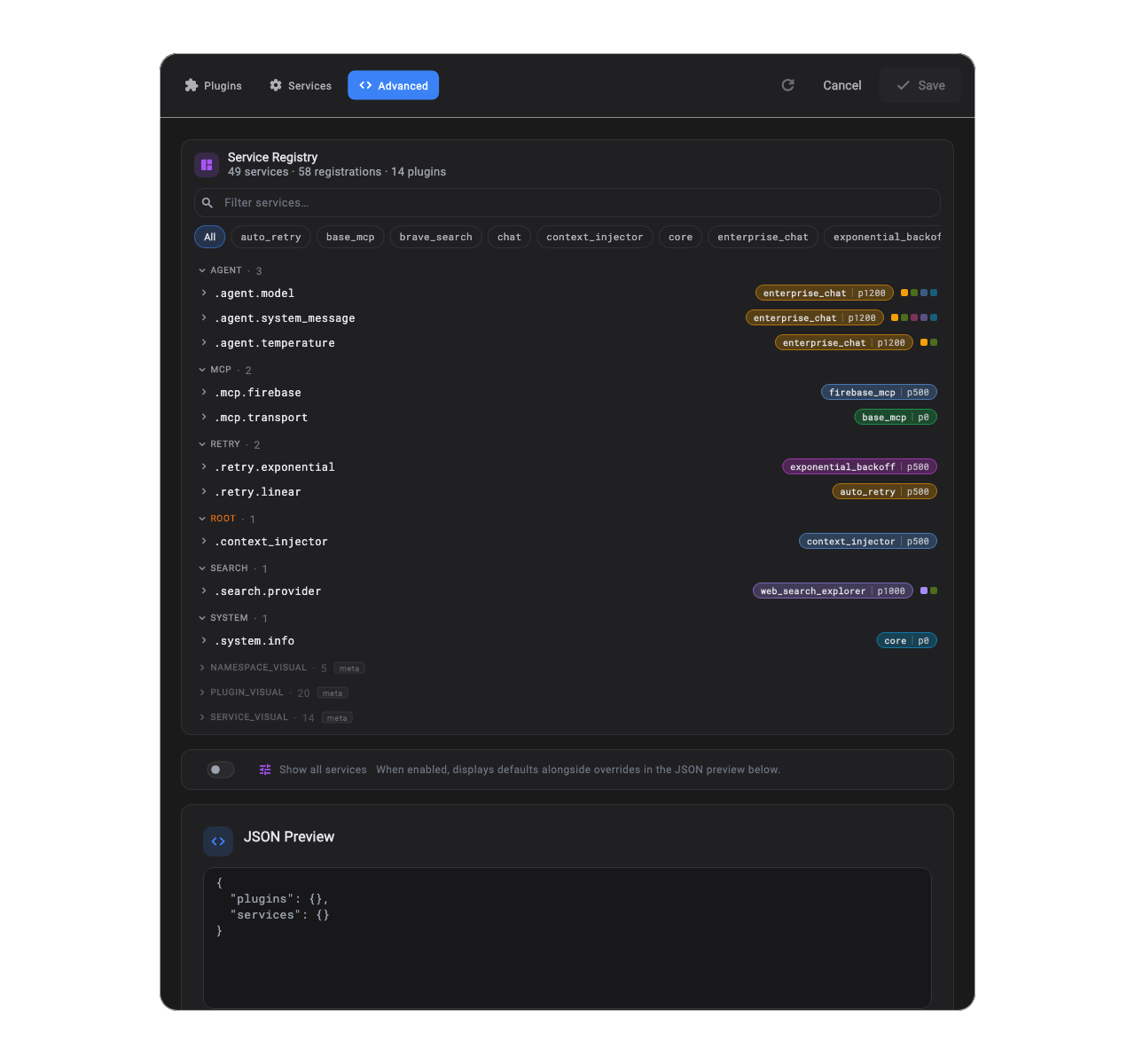
The Advanced tab is what these settings produce at runtime. Every slot, every registrant, every effective priority. The chip on the right of each row is the current winner for that slot.
Applying settings
Section titled “Applying settings”There are three common paths.
1. Initialize with settings
Section titled “1. Initialize with settings”/// Demonstrates initializing a runtime with explicit settings.void initWithSettings(RuntimeSettings settings) { final runtime = PluginRuntime(plugins: [CasualPlugin(), FormalPlugin()]) ..init(settings: settings); print('enabled: ${runtime.enabledPluginIds}');}2. Reconcile live settings
Section titled “2. Reconcile live settings”/// Demonstrates calling updateSettings live.Future<void> reconcileSettings( PluginRuntime runtime, RuntimeSettings nextSettings,) async { await runtime.updateSettings(nextSettings);}This is the full lifecycle-aware path. It reconciles the global scope and every active session.
This is the call behind things like:
- a plugin customization dialog
- a model/provider switcher
- workspace-scoped feature toggles
- “turn this experimental subsystem off right now” moments
If the user should be able to feel the change immediately, this is usually the right path.
3. Update the snapshot without lifecycle work
Section titled “3. Update the snapshot without lifecycle work”/// Demonstrates the snapshot-only update path.void snapshotOnly(PluginRuntime runtime, RuntimeSettings nextSettings) { runtime.updateSettingsSnapshot(nextSettings);}This updates the runtime’s stored settings and emits on settingsStream. It does not run reconciliation, and it does not inject new config into already-resolved services. Useful for optimistic UI, bookkeeping updates, and anything where you are confident the runtime does not need to converge. When unsure, reach for updateSettings(...) instead.
Low-level scope-specific APIs
Section titled “Low-level scope-specific APIs”When you want finer control over which scope reconciles, the runtime exposes the two pieces separately:
updateGlobalSettings(...)updateSessionSettings(...)
That split is useful when your application wants finer control over which scope reconciles when.
Live-toggling session plugins
Section titled “Live-toggling session plugins”Toggling a session plugin via updateSettings runs the full lifecycle, same as global: detach on disable, register + attach on enable. Direct subscriptions from your plugin’s attach are torn down on disable automatically, as long as you used the tracked helpers (on, onRequest, bind) instead of reaching into context.bus. See Runtime for the exact sequence.
JSON support
Section titled “JSON support”RuntimeSettings, PluginConfig, and ServiceSettings all round-trip through JSON.
void demonstrateToJson() { final json = settings.toJson(); final restored = RuntimeSettings.fromJson(json); assert(restored.plugins.length == settings.plugins.length);}That makes the settings model usable for persisted user preferences, workspace settings, admin-defined defaults, or UI-driven editors.