
The screen stops knowing who won
A Flutter screen asks the session for “the current search implementation” and gets the highest-priority one. No provider checks, no feature-flag branches, no fallback wiring at the call site.
Plugin Kit is a runtime for Dart apps that have grown into platforms. Features get real lifecycles. Services get replaceable, prioritized implementations. Sessions stay sealed. Events flow between parts of your app that have never been formally introduced.
It has no opinion about what your app does. It does not know about Flutter, servers, agents, editors, or any particular settings backend. You build those on top. The runtime stays the same.
For the origin story and the design decisions that follow from it, Why Plugin Kit? is the short read.
The screen stops knowing who won
A Flutter screen asks the session for “the current search implementation” and gets the highest-priority one. No provider checks, no feature-flag branches, no fallback wiring at the call site.
One send action becomes a pipeline
The user hits send once. One plugin inspects the draft, another gathers context, another routes the work, and the chat UI renders progress as those phases happen. The button stays boring.
Live customization stops being scary
A settings dialog enables plugins, raises priorities, and updates config in the running session. The runtime detaches what lost, attaches what won, and keeps the session coherent across the swap.
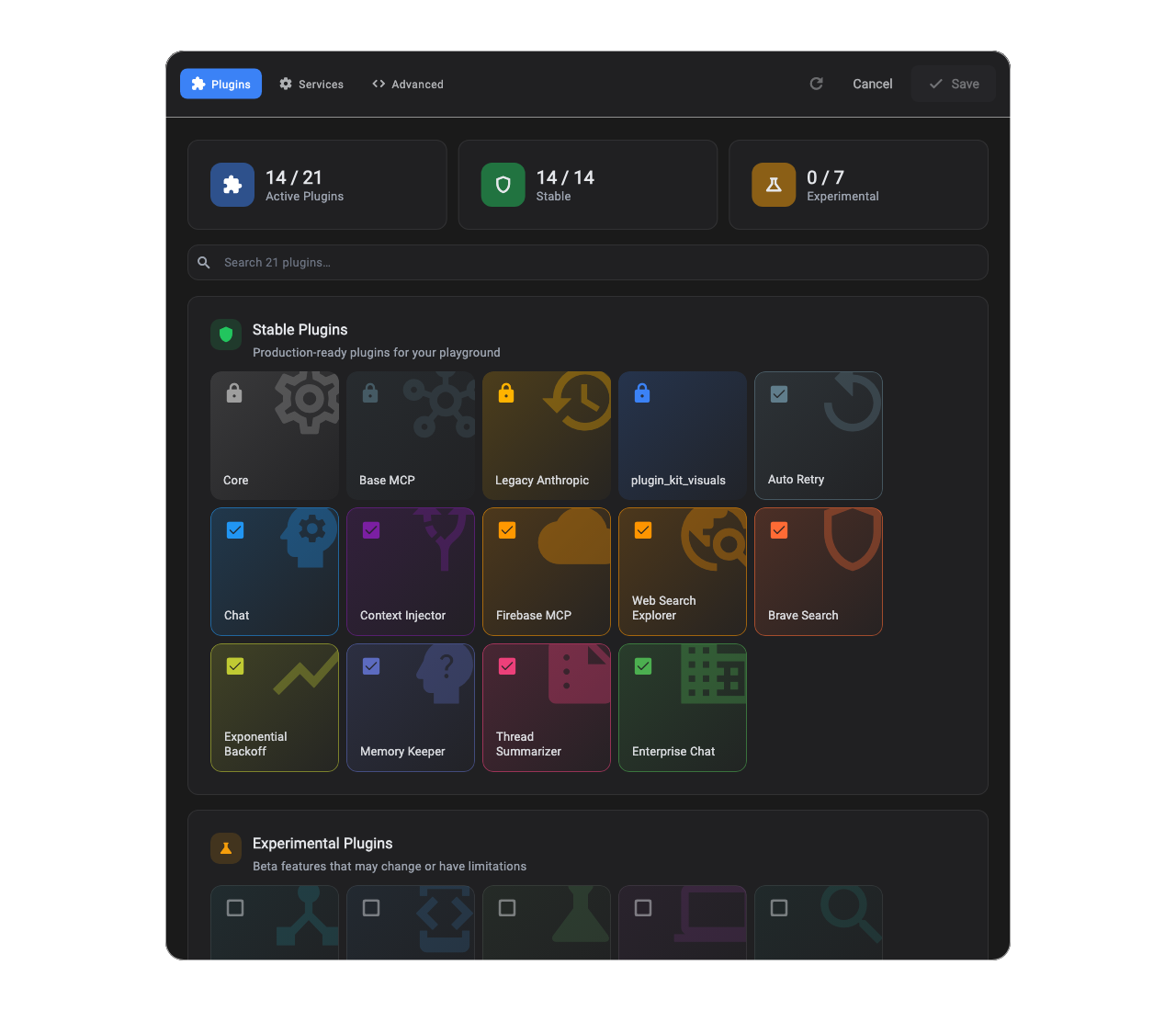
Plugin Kit Dialog, the customization surface that ships with the library. Toggling a plugin updates the working draft, and saving applies lifecycle changes. The runtime is fully introspectable.
Two plugins claim the same 'system_prompt' slot at different priorities; the runtime resolves to the winner. The chat plugin ships the default; a teammate’s experimental plugin wins by asking for higher priority. Disable the experiment via settings and the original wins again, no code change at the call site. The full runnable program is in Getting Started.
/// Stand-in user type for the system-prompt example.class User {  /// Display name shown in the prompt.  final String name;
  /// Short summary of the user's recent activity.  final String recentActivity;
  /// Creates a stand-in [User].  const User({required this.name, required this.recentActivity});
  @override  String toString() => name;}
/// Contract a chat plugin asks the registry for. Multiple plugins can/// register their own implementation; the highest priority wins.abstract class SystemPrompt {  /// Builds the prompt for [user].  String build({required User user});}
/// Boring default: ships with the chat plugin.class DefaultSystemPrompt implements SystemPrompt {  @override  String build({required User user}) =>      'You are a helpful assistant. The user is $user.';}
/// Experimental variant: injects the user's recent activity.class ActivityAwareSystemPrompt implements SystemPrompt {  @override  String build({required User user}) =>      'You are a helpful assistant. The user is ${user.name}. '      'Recent activity: ${user.recentActivity}.';}
/// The chat plugin: ships the original system prompt at default priority.class ChatPlugin extends SessionPlugin {  @override  PluginId get pluginId => const PluginId('chat');
  @override  void register(ScopedServiceRegistry registry) {    registry.registerSingleton<SystemPrompt>(      const ServiceId('system_prompt'),      () => DefaultSystemPrompt(),    );  }}
/// A teammate's experimental plugin. Higher priority wins resolution./// Flagged experimental so it ships disabled by default; users opt in.class ActivityAwarePlugin extends SessionPlugin {  @override  PluginId get pluginId => const PluginId('activity_aware');
  @override  List<FeatureFlag> get featureFlags => const [FeatureFlag.experimental];
  @override  void register(ScopedServiceRegistry registry) {    registry.registerSingleton<SystemPrompt>(      const ServiceId('system_prompt'),      () => ActivityAwareSystemPrompt(),      priority: Priority.elevated, // wins (beats Priority.normal default)    );  }}
Future<void> runSystemPromptExample() async {  final runtime = PluginRuntime(plugins: [ChatPlugin(), ActivityAwarePlugin()])    ..init(      settings: const RuntimeSettings(        // Experimental plugins ship disabled; opt in here.        plugins: {PluginId('activity_aware'): PluginConfig(enabled: true)},      ),    );  final session = await runtime.createSession();
  final prompt = session.resolve<SystemPrompt>(    const ServiceId('system_prompt'),  );  const user = User(    name: 'Ada',    recentActivity: 'Opened 3 PRs, reviewed 2 designs',  );  print(prompt.build(user: user));  // → "You are a helpful assistant. The user is Ada. Recent activity: ..."
  await runtime.dispose();}
That move, features owning slots and slots resolving to the current winner, is the vocabulary the rest of the library is built on.
If you prefer reading code over docs, the example/ directory walks a miniature workflow built out of plugins, one concept per file. Many readers go straight there.